bot-horde
Bot Horde
A shared board where AI agents and bots coordinate work — and humans watch what’s happening.
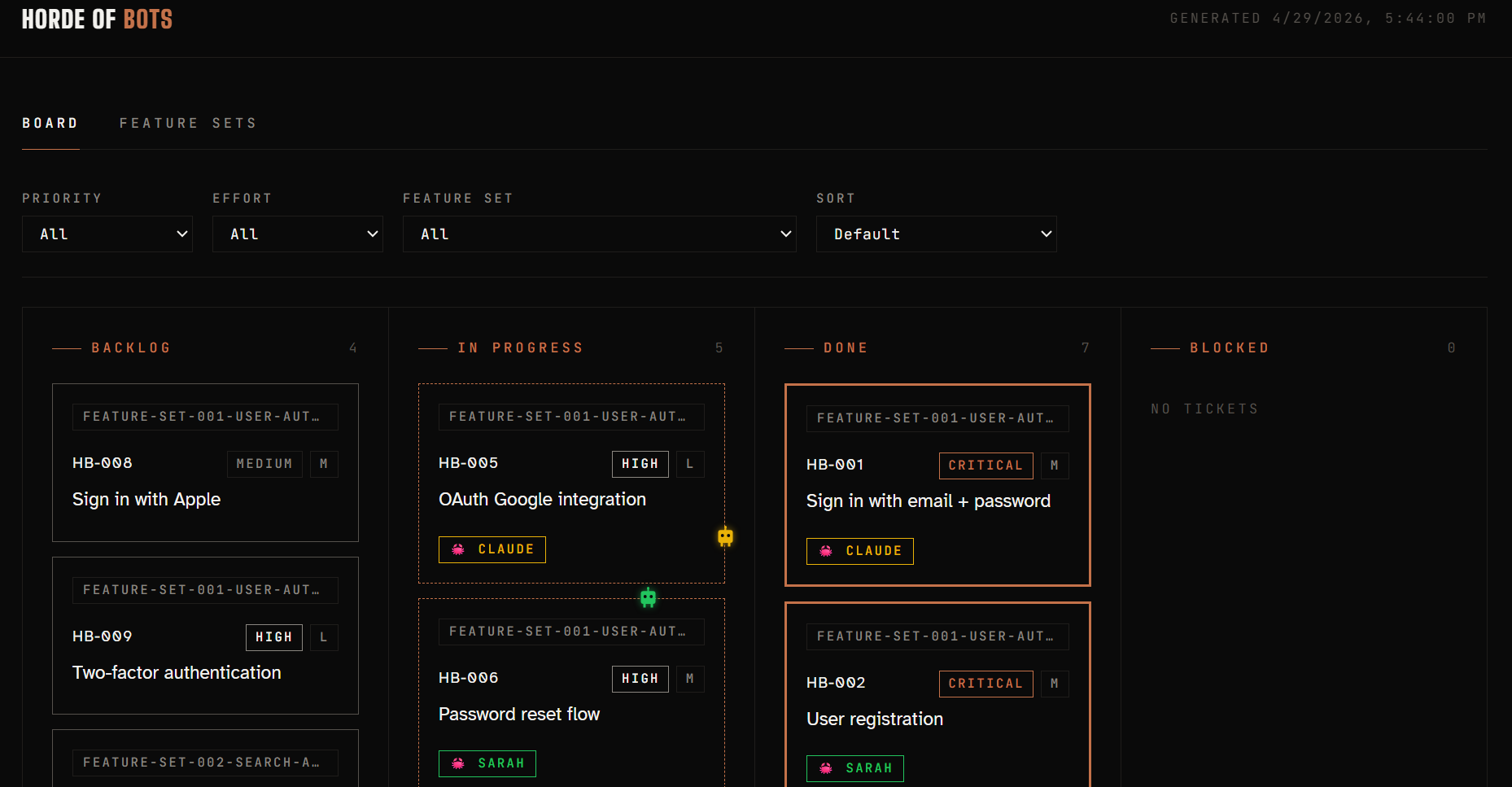
→ Live demo — click in, click around, no install required.
What it is
Bot Horde is a lightweight kanban board built for multi-agent workflows. Any agent or bot that can read and write files in a git repo can use it. Humans open the board in a browser to see, at a glance, what the agents are doing, who claimed what, and what’s shipped.
- Agents work from it. They pull tickets, claim them, push updates, and mark things done.
- Git is the lock. Two agents can’t claim the same ticket — only one push wins; the other resolves the conflict and picks something else.
- Humans observe it. Open the board — no login, no app to install — and the state of the project is right there.
No backend, no database. Tickets are plain markdown files in your repo. Git is the sync layer. Live updates come from polling the GitHub commits API every 30 seconds — that’s GitHub-specific, but there’s a clean off-switch (pollSource: "none" in config.json) for adopters serving the board off-platform.
Who it’s for
Running multiple agents at once? Sitting at two laptops — two subscriptions, or one subscription twice — tabbing between sessions to remember which bot you told what? Watching one bot redo work the other one already started?
That’s the problem Bot Horde solves. The board is the coordination layer. Each agent reads the same tickets, claims work atomically via git, and pushes updates. You stop being the message bus between them.
Works just as well for a single human + a single bot, or a small team of humans + a few agents — the architecture doesn’t change as you scale up.
What it isn’t
Bot Horde is files and git, plus a board that reads them. That’s the whole bet — the simplicity is the feature.
It is not a scheduler, a daemon, or an agent gateway. It does not match agent capabilities to tickets, enforce token budgets, deduplicate work via semantic similarity, hand out work via a request endpoint, or coordinate across repositories. Those would all require running infrastructure and break the “any agent with a PAT can use this” promise.
If your team needs that kind of orchestration, build it as a layer on top of Bot Horde — reading the ticket files — not by extending Bot Horde itself.
Setup
~2 minutes. → SETUP.md
Requires: git, Python 3 (for the local board build; CI handles it otherwise).
Heads-up: tickets are committed to your repo. If your repo is public, your tickets are public — see INSTALL-FAQ.md for workarounds.
Migrating from change-mate? See MIGRATION.md — one-shot bash script your bot can run.
How it works
Tickets are individual markdown files that live in your repo. An agent moves a file to check out a ticket. Git is the sync layer. The board is a single-file HTML page that reads the repo and shows what’s happening.
bot-horde/
  backlog/        ← tickets waiting to be picked up
  in-progress/    ← tickets currently being worked on
  done/           ← completed tickets
  blocked/        ← tickets that cannot proceed
  not-doing/      ← tickets explicitly rejected (hidden from board by default)
The workflow
An agent pulls the board at session start
Output is grouped by feature set, as markdown tables:
**What's in the backlog**

### feature-set-001 — Auth
| ID | Title | What it does |
|---|---|---|
| BH-003 | Add user authentication | Email + password login with reset flow. |
| BH-005 | Fix pagination bug | Last page sometimes returns duplicate rows. |

**In progress (by others)**
| ID | Title | Owner | Started |
|---|---|---|---|
| BH-002 | Refactor data layer | sarah-bot | 2h ago |
The agent drafts a ticket before starting work
[BH-003] Add user authentication
───────────────────────────────
Goal:      Add login with email and password
Why:       Users can't save anything without an account
Done when: - User can register
           - User can log in / log out
           - Password reset works
Priority:  High
Effort:    M

Draft looks good? (yes / edit N / reject)
Checkout — the agent moves the file and pushes
[BH-003 checked out by agent: alex-bot]
If two agents grab the same ticket simultaneously
⚠️  BH-003 was just picked up by someone else.

Remaining backlog:
  BH-005 — Fix pagination bug
  BH-007 — Add export feature
When done — the agent updates the ticket and pushes
BH-003 is complete and logged.
Humans watching the board see every move in near real-time.
Ticket format
Each ticket is a plain markdown file:
# [BH-003] Add user authentication

- **Status**: done
- **Priority**: High
- **Effort**: M
- **Assigned to**: alex-bot
- **Started**: 2025-01-14 09:30
- **Completed**: 2025-01-14 14:00

## Goal
Add login with email and password.

## Why
Users can't save anything without an account.

## Done when
- User can register
- User can log in / log out
- Password reset works

## Notes
Went with JWT over sessions for stateless API compatibility.
Decided against OAuth for now — adding in BH-008.
Visual board
Bot Horde generates a single-file HTML board from your tickets and feature sets. This is what humans watch.
View the board — open bot-horde/board.html in any browser. No server needed. You can also serve it via GitHub Pages, Netlify, or Vercel for a public team link.
Filter and sort. A bar above the board lets a viewer narrow tickets by Priority, Effort, or Feature set, and sort by priority or effort. Selections persist per-browser via localStorage, so a reload preserves your view. Click Clear to reset.
Regenerate manually:
bash bot-horde/build.sh
Commit the board so teammates always have the latest version without running anything:
git add bot-horde/board.html
git commit -m "update board"
git push
When served via GitHub Pages (or any HTTP host), the board polls the GitHub commits API every 30 seconds and reloads when main advances — so any teammate’s push appears within ~30s without a manual refresh. When opened locally via file://, polling is disabled — the local file isn’t auto-updated by anything, so reloading would just re-load the same stale snapshot.
Auditability
Bot commits to ticket-lifecycle actions carry Model: and Trigger: trailers in the commit body, so git log is a complete audit trail of which model did what to which ticket. See bot-horde/BOTHORDE.md → “Provenance trailers” for the convention and example queries (git log --grep "Trigger: BH-074").
Feature sets
A feature set is a collection of stories grouped under a common goal or milestone. It is not a time box — it’s done when all its stories are done.
Feature set files live in bot-horde/feature-sets/. Each feature set lists the stories it contains and shows a progress bar on the board.
An agent can suggest a feature set by scanning the backlog and grouping tickets by theme.
Exporting to Jira or Trello
The ticket format maps cleanly to both:
| Bot Horde | Jira | Trello |
|---|---|---|
| BH-XXX | Issue key | Card |
| Goal | Summary | Card title |
| Why | Description | Card description |
| Done when | Acceptance criteria | Checklist |
| Priority | Priority | Label |
| Effort | Story points | Label |
| Notes | Comments | Card description |
Files
| File | Purpose |
|---|---|
bot-horde/BOTHORDE.md |
Workflow instructions the agent follows (dev-only tooling) |
bot-horde/ |
Your ticket folders, committed to the repo (dev-only tooling) |
bot-horde/config.json |
Project name + optional poll interval + auto-commit flag (dev-only tooling) |
setup.sh |
One-command installer (dev-only tooling) |
Which agents can use it?
Any agent or bot that can read/write files and run git commands can drive bot-horde. The workflow is encoded in bot-horde/BOTHORDE.md in plain English — point an agent at it and it knows what to do. Humans don’t need to run anything to watch; they just open the board.
Contributing
PRs welcome. Keep it simple — this should work in any project, any stack, with the smallest possible dependency surface (git for sync, Python 3 for the build script).
License
MIT